I've got some news that might be tough to swallow: that 42% open rate you’re so proud of is probably a mirage. Knowing for sure if a prospect has read your email has gotten incredibly tricky, thanks in large part to privacy updates like Apple's Mail Privacy Protection (MPP).
The real game isn't about if your email was opened anymore. It's about figuring out if your prospect is actually engaged.
The End of Open Rates and the Rise of Real Engagement

For years, we all lived and died by the open rate. It was our North Star, telling us if our subject lines were working and our message was getting through. But the ground has shifted beneath our feet, and that metric is now fundamentally broken.
The main reason? Apple’s Mail Privacy Protection, or MPP. Since its launch in 2021, MPP has been quietly upending our data by pre-loading email images—including the invisible tracking pixels we rely on—on a remote server. This happens before the user even sees the email, making it look like it was opened when it may have been completely ignored.
Just How Inflated Are Your Metrics?
This isn't just a small statistical quirk; it's a massive blind spot. Given that Apple Mail accounts for a staggering 60.6% of the email client market, a huge chunk of your "opens" are likely just phantom signals from Apple's servers. Relying on that data is like trying to drive with a fogged-up windshield. You're moving, but you have no real idea where you're going.
Let's put some numbers on it. While the global median email open rate reached 42.35% in 2025, MPP can easily inflate that figure by 20-30%. So, for a sales team chasing pipeline, a celebrated 42% open rate might actually translate to only 30% of people genuinely opening your email. You can dig deeper into these email open rate statistics to see the full impact.
This forces us to reframe the entire goal. Instead of asking, "Was my email read?" we should be asking, "What actions prove my prospect is actually interested?"
This change in mindset is everything for a modern sales pro. Chasing vanity metrics like open rates just leads to wasted time and bad decisions, like sending a follow-up to someone who never even saw your first message.
Shifting Your Focus to Actionable Signals
The only way forward is to track signals that show undeniable intent—actions a prospect has to take consciously, which no privacy software can fake.
These are the metrics that truly matter now:
- Link Clicks: When someone clicks a link to your case study, pricing page, or demo scheduler, they're raising their hand. It's a clear, powerful buying signal that they want to learn more.
- Replies: Nothing is more direct than a reply. Even a "not interested right now" is valuable feedback because it confirms your message was received and read. A positive reply? That’s your golden ticket to a real conversation.
By focusing on clicks and replies, you stop being a passive observer and start tracking active engagement. This is how you build a smarter, more predictable sales pipeline—by prioritizing the people who are actually showing you they're interested.
When to Bother with Read Receipts in Outlook and Gmail
Sure, there are a ton of sophisticated tracking tools out there, but most of us have been tempted by that seemingly simple solution already built into Outlook and Gmail: the read receipt. On the surface, it’s a straightforward way to confirm your email was opened.
But here’s the catch: they don't actually tell you if your email was read. They only tell you if the recipient agreed to let you know.
Every time you send an email with a receipt request, your recipient gets a pop-up asking, "Send a read receipt?" That single, optional click is their biggest flaw, especially when you're trying to make a good first impression.
Why Receipts Fail in Cold Outreach
When you're sending a cold email, you’re already asking a stranger for a slice of their valuable time. Tacking on a read receipt request is like asking for another favor before you’ve even said hello. It can come off as a bit demanding or even intrusive, creating a weird friction right from the start.
Just put yourself in their shoes for a second. You get an email from a salesperson you've never heard of, and it immediately asks for a read receipt. What's your gut reaction? If you're like most people, it's a hard "No." Not only are you left completely in the dark, but you might have just chipped away at their perception of you before they’ve even read your first sentence.
The reality is, in the world of B2B cold outreach, read receipt success rates are abysmal. It's estimated that fewer than 5% of recipients will ever click "yes" and send one back. That makes them a totally unreliable tool for prospecting.
Think about what that means. You could send 100 cold emails and get, at best, five confirmations. The other 95 leave you guessing, which is useless for building any kind of predictable sales pipeline.
Turning on Receipts for a Single Email in Outlook
Even with all their faults, receipts can be useful. I've found they're best for internal company messages or for sending critical information to existing clients who are actually expecting your email.
If you need to enable one for a specific message in Outlook, it's pretty simple.
When you have a new email open:
- Look for the Options tab in the top ribbon.
- Find the "Tracking" section and just check the box for Request a Read Receipt.
- You’ll also see an option to Request a Delivery Receipt, which is handy for confirming the email at least made it to their server without bouncing.
This one-off approach is perfect for those high-stakes moments, like when you're sending over a signed contract or a time-sensitive update.
Setting Up Receipts for All Outgoing Outlook Emails
If you're in a role that requires confirmation on everything you send—maybe for legal or compliance reasons—you can make this a default setting.
Just head to File > Options > Mail. Scroll down until you see the "Tracking" section. From there, you can check the box that says, "For all messages sent, request: a read receipt..." Be careful with this one, though. It’s definitely overkill for casual day-to-day emails and can annoy your colleagues.
How to Request Receipts in Google Workspace
Here’s something many people don’t realize: the standard, free version of Gmail doesn't have a read receipt feature at all. That function is exclusively for people using a paid Google Workspace account, which is what most businesses and schools use.
Even with a Workspace account, it's not on by default. Your account administrator has to enable the feature for the whole organization first. Once they do, you can request a receipt on an email-by-email basis.
- When you’re composing an email, click the three-dot menu in the bottom right for More options.
- Choose Request read receipt from the pop-up menu.
Just like in Outlook, this only sends a request that your recipient has to approve. Gmail doesn't even offer a "request for all emails" setting for users, which subtly encourages you to use them more thoughtfully.
In the end, whether you’re using Outlook or Gmail, the power is always with the recipient. That’s what makes read receipts a poor bet for finding out if your cold email really got read.
Read receipts are a nice idea in theory, but they’re far too easy for a recipient to ignore. That’s why most sales and marketing tools rely on a much stealthier method to see if an email was read: the email tracking pixel. It’s the secret sauce behind the “open tracking” feature you see everywhere.
The idea itself is pretty straightforward. When you turn on tracking for an email, the software slips a tiny, invisible image into your message. We’re talking a single pixel (1x1), totally transparent and impossible to spot with the naked eye.
Every pixel is coded specifically for that one email sent to that one person. When your prospect opens their inbox and their email client loads the images in your message, it has to fetch that little pixel from a server. That fetch sends a "ping" back to your sales tool, which is what triggers the "Opened" notification.
If you want to get into the nitty-gritty, this article explains in more detail what pixel tracking is and how it functions. It’s a clever workaround because, unlike a read receipt, it doesn't require the person on the other end to click "Yes."
The Privacy Wrench in the Works
For a long time, this was the industry standard for tracking opens. But there’s a massive wrench in the system now, and it’s called Apple Mail Privacy Protection (MPP). With this feature, Apple decided to throw a curveball by pre-loading email content—including our invisible tracking pixels—on its own private servers to protect user privacy.
What does this mean for you? An "open" gets logged the second Apple’s server grabs the email, not when your prospect actually opens and reads it. Someone could literally delete your email without ever laying eyes on it, and your CRM would still tell you they opened it. This flood of false positives has turned open rates into an incredibly misleading metric.
And this isn't a small problem. Apple Mail dominates the market with over 60% of all email client usage. That means a huge chunk of your open data is probably inflated and unreliable.
Relying on pixel-based open tracking alone is like trying to time a race with a broken stopwatch. The results just can’t be trusted, and basing your follow-up strategy on them is a recipe for failure.
Shifting Focus Beyond a Broken Metric
So, with tracking pixels effectively broken, what are modern sales teams supposed to do? The best platforms out there—think HubSpot, Salesloft, and even autonomous agents like Starnus—have already moved on. They recognize that the "open" is just one small, fragile piece of the puzzle.
Instead of obsessing over a single metric, they build a much richer profile of engagement by looking at multiple signals. An open might still get logged, but it’s the actions that can't be faked by privacy software that truly matter.
These are the high-intent signals you should be tracking:
- Link Clicks: When a prospect clicks a link to your case study or booking page, that’s a real, deliberate action. It's a far more powerful indicator of interest than a questionable "open."
- Reply Tracking: Nothing beats a direct reply. Whether it's a question, an objection, or an acceptance, it’s definitive proof your email was read and considered.
- Attachment Views: Did you send a proposal or a spec sheet? Seeing if they actually opened the document gives you another solid layer of engagement data.
The flowchart below shows exactly why the old read receipt method fell out of favor. It hits a dead end the moment the user says "no," which is why the industry shifted toward pixels and, now, toward a more holistic view of engagement.
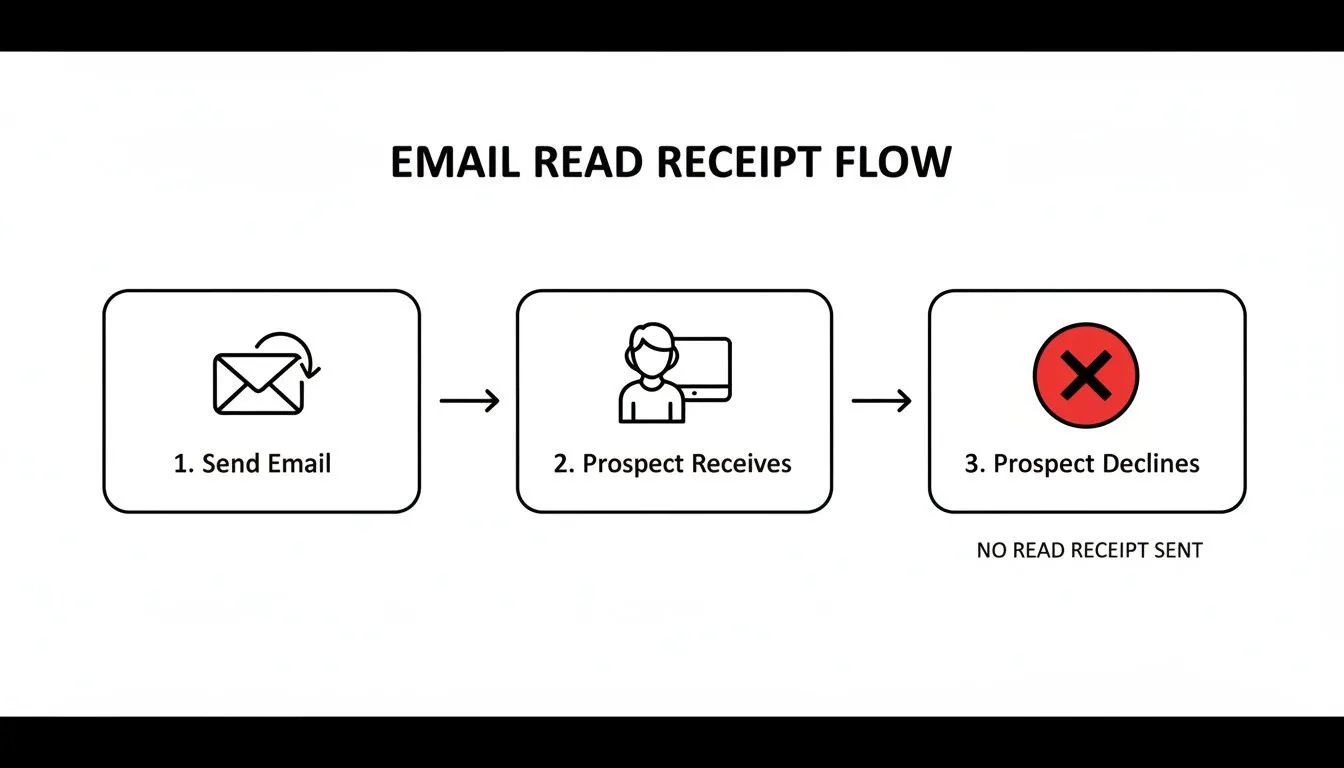
This highlights the core weakness of consent-based tracking: the sender is left in the dark if the recipient simply declines the request.
This is where a multi-signal approach becomes so powerful. An autonomous sales platform, for example, won’t just see an "open" and fire off a generic follow-up. It looks at the whole picture. Did they click the pricing page link? Did they reply asking for more details? These are the data points that trigger truly intelligent next steps, helping you understand which emails are actually being read and acted upon.
With open rates becoming an unreliable ghost in the machine, it's time to shift your strategy. You can no longer fully trust whether an email was truly opened, so your focus has to move to what happens after the open—the tangible, deliberate actions a prospect takes.
This means prioritizing clicks and replies above everything else. These aren't passive, accidental metrics that privacy software can fake. They are active signals of genuine interest, proving your message not only landed but also resonated enough to make someone act.

Why Clicks and Replies Are the New Gold Standard
A click is an undeniable sign of intrigue. When a prospect clicks a link to a case study, a demo scheduler, or your pricing page, they are actively raising their hand. They're moving themselves down the funnel. It's a clear, measurable action that shows real intent.
Replies are even better. Whether it’s a “tell me more” or a “not right now,” a direct response confirms your email was read and understood. It opens a dialogue, gives you priceless feedback, and hands you a concrete next step.
Shifting your strategy to optimize for clicks and replies isn't just about adapting to new privacy rules. It's about focusing your energy on prospects who are actively engaging, which is the most direct path to building a predictable sales pipeline.
Smart sales teams and RevOps leaders are leaning heavily on metrics that measure this real engagement. While read receipts have always been mostly a myth—with only 10-20% of recipients ever enabling them—the data around click-based metrics tells a much more useful story.
We're now seeing a greater emphasis on benchmarks like the click-to-open rate (CTOR). For B2B software, for example, a healthy CTOR is around 6.18%. This is a powerful indicator that your content is hitting the mark. This data-driven approach lets you see past the noise of inflated open rates and focus on what’s actually working.
To give you a clearer picture of what to aim for, here are some recent B2B industry benchmarks.
B2B Industry Email Engagement Benchmarks (2026)
| Industry | Average Open Rate | Average Click-to-Open Rate (CTOR) | Target Reply Rate |
|---|---|---|---|
| Technology/SaaS | 21.5% | 6.18% | 1-3% |
| Financial Services | 27.1% | 2.65% | 0.5-2% |
| Manufacturing | 30.5% | 3.51% | 1-2.5% |
| Professional Services | 28.9% | 4.12% | 2-4% |
| Healthcare | 23.4% | 3.20% | 0.5-1.5% |
Keep in mind that these are just averages. Your goal should be to beat these numbers by creating emails that are impossible to ignore.
Crafting Emails That Invite Interaction
Knowing you need more clicks and replies is one thing; actually getting them is another. Your email copy has to be engineered to provoke a response. This means moving away from simply broadcasting information and toward starting a real conversation.
Here are a few ways to do just that:
- Embed High-Value Links: Don't just talk about your solution. Link directly to a resource that proves its value—a compelling case study, a short product demo video, or an insightful industry report. Frame it as a helpful next step, not a hard sell.
- Ask Thoughtful, Open-Ended Questions: Ditch generic closers like "let me know if you're interested." Instead, ask something that requires a real answer. Try, "What's your team's biggest hurdle with [pain point] right now?"
- Make Your Call-to-Action (CTA) Specific: Your CTA needs to be crystal clear. Instead of "learn more," go with "See how [Client Name] achieved a 3x ROI." This makes the value of clicking obvious. Of course, none of this matters if your emails don't land in the first place, so it's always smart to learn how to check if an email address is valid before you even hit send.
Putting It All Together
Think about it this way. A sales team sends a campaign to 1,000 prospects. Their tracking tool reports a 45% open rate, but they know that number is likely inflated by privacy filters.
Instead of chasing those ghost "opens," they focus on their 8% CTOR. They see that 36 people (8% of the 450 reported opens) clicked the link to a specific case study about solving a critical industry problem.
Those 36 prospects are now their top priority. They are no longer guessing who is interested; they know who has shown active intent. This lets them focus their follow-up efforts where they'll have the most impact, building a pipeline based on real, measurable engagement.
A Word on the Ethics of Email Tracking
Knowing when someone opens your email is powerful. But with that power comes a serious responsibility. The moment you start tracking opens and clicks, you're wading into the waters of privacy and ethics. This isn't just about sidestepping legal landmines; it’s about building trust from the very first email you send.
You've probably heard of the big ones: Europe’s General Data Protection Regulation (GDPR) and the California Consumer Privacy Act (CCPA). These regulations have pretty strict rules about how you collect and use personal data, and yes, that includes a prospect's email activity.
Staying on the Right Side of the Privacy Line
The spirit behind these laws boils down to transparency and consent. Now, in most B2B sales scenarios, you don’t need to get explicit permission for every tracked email—it often falls under a concept called "legitimate interest." But the ethical line is still crystal clear. Is your tracking meant to help the prospect, or just to monitor them?
The best outreach builds trust. Think of tracking as a tool for personalization, not surveillance. This people-first mindset is what turns cold leads into lasting customer relationships.
For example, let's say your tracking shows a prospect clicked a link to a case study for the manufacturing industry. That’s a fantastic signal. Your next follow-up can be laser-focused: "I saw you might be interested in how we helped another manufacturing firm solve [specific problem]. Is that something your team is wrestling with?" That’s genuinely helpful.
The flip side? Calling a prospect thirty seconds after they open your email and saying, "Hey, I know you just read my message." That's just creepy. It shatters any trust you might have built and turns your outreach into a "gotcha" game instead of a real attempt to connect.
Practical Tips for Tracking Ethically
Being ethical doesn’t mean giving up on tracking. It just means you have to be smarter and more respectful about how you use the information you gather.
Here are a few ground rules to keep your outreach both effective and respectable:
- Focus on Value, Not Surveillance: Use tracking data to figure out what your prospect actually cares about. A click on your pricing page means something very different from a click on a blog post. Your follow-up should reflect that difference.
- Be Transparent Where it Counts: You don't need a giant disclaimer on every cold email. But having a link to your privacy policy in your signature is a simple, professional way to show you aren’t hiding anything.
- Use Data to Personalize, Not Pounce: The whole point is to make your next email better. If a lead opens your email but doesn't reply, use that data to send them a relevant resource later on, not just another generic "bumping this up" message.
- Prioritize Real Engagement Signals: Like we've talked about, clicks and replies are the gold standard. A prospect actively gives you this information, making it an ethically sound signal of real interest. It's also far more valuable for your pipeline. For more on this, check out our guide on how to automate cold email without landing in spam, which has some great tips on maintaining a healthy sender reputation.
At the end of the day, it all comes down to one question: are you using this information to help your prospect? If the answer is yes, you’re on the right track.
Building Your Autonomous Outbound Strategy
Alright, we know old-school metrics are failing us. So, let's talk about building an automated outbound strategy that actually works in today's privacy-first world. This isn't just theory; it's a framework built entirely around the engagement signals that matter.
The foundational principle is a total shift in mindset: prioritize replies and clicks over opens. An "open" is passive, unreliable, and easily faked by privacy tools. A click or a reply, on the other hand, is a conscious choice—a clear signal of genuine interest.
Automating for Real Engagement
Here's where an AI sales agent like Starnus comes into play. Instead of you or your team manually digging through your CRM for those clicks and replies, an autonomous system takes over. It essentially becomes your most efficient sales development rep, working 24/7.
A dedicated AI agent can:
- Monitor all the signals coming back from your campaigns in real-time.
- Instantly spot high-intent actions, like a prospect clicking your demo link.
- Update your CRM on the fly, tagging that lead as "hot" or "engaged."
- Trigger the next logical step in your sales sequence without anyone lifting a finger.
Think about it: your system sees a prospect click a case study link. It immediately queues up a personalized follow-up for the next morning, maybe referencing a specific result from that study. That’s the kind of intelligent automation that closes deals.
From Messy Data to a Predictable Pipeline
Moving from manual tracking to autonomous action is essential for scale. With a projected 408 billion emails to be sent daily by 2027, the volume is simply too much to handle manually. B2B sales teams are already ditching open rates, with reply rates becoming the real proof that an email was read.
While a 5-8% reply rate is a solid average for outbound, you can push that as high as 15% with hyper-personalization. The latest email marketing statistics show that top performers are winning by focusing on these meaningful interactions.
An autonomous system turns this engagement data into a predictable pipeline. It doesn't just see if an email was opened; it understands what that click or reply means and acts on it instantly. This frees your team from the guesswork of bad data and lets them do what they do best—have conversations with prospects who are already warmed up.
Of course, connecting your automation to your customer data is key, which is why optimizing your CRM and workflow automation is a non-negotiable first step. By building this kind of intelligent, action-based approach, you create a resilient sales engine that runs on real signals, not vanity metrics.
Frequently Asked Questions About Email Tracking
Trying to figure out who's actually reading your emails can feel like a moving target. With all the new privacy features rolling out, it's hard to know which metrics are real and which are just noise. Let's clear up a few of the most common questions people have.
Can I See If My Email Was Read Without the Recipient Knowing?
Yes, but the answer isn't as simple as it used to be. Most email tracking software uses a tiny, invisible pixel that loads when an email is opened. Unlike a traditional read receipt, this doesn't ask for the recipient's permission.
The problem? This method is becoming pretty unreliable. Tools like Apple's Mail Privacy Protection (MPP) now pre-load these pixels for their users, which triggers a false "open" signal on your end. So while you can track opens secretly, the data you get is often misleading. It’s much smarter to focus on metrics that can't be faked.
Why Am I Not Getting a Read Receipt?
You’re not alone. There are a handful of reasons why read receipts rarely come back.
The most obvious one is that the recipient simply clicked "No" when asked to send a confirmation. Many people have also disabled receipts in their email settings altogether for privacy reasons—it's a very common practice.
On top of that, not all email clients even support them. And sometimes, just viewing an email in a preview pane won't trigger the receipt request. In B2B sales, our data shows that fewer than 5% of cold outreach recipients ever send one back. They just aren't a reliable tool for prospecting.
The most reliable proof of interest comes from active engagement, not passive opens. A click on a link or a direct reply is a deliberate action that shows real intent, confirming your message was seen and understood.
What Is the Most Reliable Way to Know If Someone Is Interested?
Forget opens. The two signals that truly matter are link clicks and replies.
An "open" can be easily faked by privacy software, but a click on a link—whether it’s to book a demo or view a case study—is an intentional action. It’s a clear sign of genuine interest. A direct reply is even better, as it confirms your message was read and understood.
When building your outreach strategy, focusing on how to get actual responses is far more valuable than worrying about open rates. Following a solid set of cold email best practices will help you craft messages that drive that kind of engagement. The sharpest sales teams I know write emails that encourage these actions and obsessively track metrics like Click-to-Open Rate (CTOR) and Reply Rate.
Ready to move beyond unreliable open rates and build a sales pipeline based on real engagement? Starnus is an AI employee that autonomously runs your entire outbound engine, from finding leads and personalizing messages to tracking the clicks and replies that truly matter. Let an AI agent surface your hot leads so you can focus on closing deals. Get started with Starnus today.
Ready to automate your outbound sales? Try Starnus and let AI handle prospecting, outreach, and follow-ups while you focus on closing deals.