Verifying an email address is more than just checking for an "@" symbol. The most reliable checks happen behind the scenes, confirming a domain has a mail server and then poking that server to see if a specific mailbox actually exists—all without ever sending an email.
Why Email Validation Is Your First Line of Defense

Before you hit "send" on your next big outbound campaign, let's talk about what's really on the line with your email list. An invalid address isn't just a missed opportunity; it’s a direct hit to your sender reputation and your ability to land in the inbox.
Sending emails to a list full of bad addresses is like shouting into a void. Not only do your messages disappear, but the echoes—the bounces—come back to haunt you. A high bounce rate, which is anything over 2%, is a massive red flag for providers like Gmail and Outlook. It tells them your sending habits are sloppy, putting your domain at risk of getting flagged as spam or, worse, blacklisted completely.
The Real-World Consequences of a Dirty List
I’ve seen the damage from a dirty email list firsthand, and it goes way beyond just poor deliverability. Picture this: you launch a huge campaign only to see 10-15% of your beautifully crafted messages bounce right back. This isn't just a number on a dashboard; it's a real blow to your pipeline and your resources.
The fallout adds up fast:
- Wasted Sales Efforts: Every bounced email represents a lead your team researched and personalized outreach for—a lead that never existed. Your reps end up chasing ghosts instead of talking to real, interested prospects.
- Skewed Campaign Metrics: Bad data completely throws off your open, click, and reply rates. You can't trust your numbers, which makes it impossible to know what’s working and what isn’t.
- Financial Drain: You pay for every single email you send, whether it arrives or not. A dirty list is literally you paying to damage your own sender reputation.
Email validation has moved from a simple IT task to a core strategy for building a predictable, profitable sales pipeline. Think of it as your first line of defense against wasted money and a tarnished reputation.
This urgent need for clean data has created a massive industry. The global email verification market is expected to jump from $1.28 billion in 2026 to $2.46 billion by 2035. This isn't just a passing trend; it reflects the critical importance of getting this right as email volumes continue to soar.
For any B2B team, where every single lead counts, knowing how to check if an email is valid is non-negotiable. It’s what ensures your message actually gets a chance to be read. To truly appreciate why Email Address Verification: Boost Deliverability & ROI is so crucial, you have to see it as a fundamental business function.
Mastering the Foundational Email Hygiene Checks

Before you even think about the heavy-duty technical stuff like server pings or APIs, let’s get the basics right. These simple, non-technical checks are your first line of defense. They’re designed to catch the most obvious errors and can prevent a huge chunk of bounces before you even hit "send."
Think of this as the initial "eyeball test" for your lead list. The very first thing to check is syntax and format. Every single email has to follow the same simple rule: a local part (the name), an "@" symbol, and a domain. It sounds almost too simple to mention, but you'd be shocked how many errors from manual entry or bad data scrapes fail this test.
This first pass is all about spotting the glaringly obvious mistakes. An address like "john.doecompany.com" is dead on arrival—it's missing the "@" symbol. Another common one is "jane.doe@company com," which fails because of that stray space in the domain. Catching these is easy, and it’s the quickest win you’ll get in cleaning your list.
Spotting Common Syntax Flaws
You don’t need any fancy tools for this part. A quick visual scan or a simple filter in your spreadsheet is often enough to catch the most common syntax problems. Here’s what you should be on the lookout for:
- Missing or Multiple "@" Symbols: An address must have exactly one "@". No more, no less.
- Invalid Characters: Weird characters like parentheses, commas, or semicolons almost never belong in an email address.
- Leading or Trailing Dots: An address can't start or end with a period. This goes for both the name part and the domain part.
- Spaces Where They Don't Belong: Spaces are a definite no-go. This is usually a red flag for a copy-paste mistake.
A quick syntax check is the fastest way to improve your list quality. It’s a simple, manual step that weeds out a surprising number of undeliverable addresses and saves you from those immediate hard bounces.
Once an email passes the basic format check, the next step is to make sure its domain is legitimate and can actually receive mail. This means looking at the domain itself for typos. A classic example I see all the time is something like "john.doe@gmal.com" instead of "gmail.com." This is a typosquatting domain—it looks right, but it's completely wrong. If you need more tips on sourcing quality emails in the first place, our guide on how to find someone's email from LinkedIn is a great resource.
Finally, it's a smart move to perform a complete domain reputation check. Why? Because even if a domain technically exists and can receive mail, a bad reputation can send your emails straight to the spam folder. A poor reputation score is a huge red flag that you're trying to contact someone through a low-quality or even malicious domain, which completely defeats the purpose of your outreach.
Alright, you’ve handled the basics like checking for typos and obvious syntax mistakes. Now it's time to get into the methods the top outbound teams use to protect their sender reputation and actually get replies. This is where we separate the amateurs from the pros.
The most powerful way to confirm an email address is real without actually sending an email is through what’s called an SMTP handshake.
Think of it like this: your verification tool walks up to the recipient's mail server, gives a polite knock, and asks, "Hey, does jane.doe have a mailbox here?" The server gives a straight "yes" or "no" answer, and you get your confirmation before a single email ever leaves your outbox.
This is the gold standard because you're asking the source of truth—the server that would handle the delivery. A 'yes' from the server is the highest level of confidence you can get that an email address is valid and ready to receive.
The Magic Behind SMTP Verification
This whole "conversation" with the server, the SMTP handshake, happens in the blink of an eye. It mimics the first few steps of sending an email but stops just before transmitting your message.
Here’s a simplified breakdown of what that quick check-in looks like:
- First, your tool finds and connects to the recipient's mail server.
- It then introduces itself with a "hello" command.
- Next, it asks if a specific recipient exists, like
RCPT TO:. - Finally, it listens for the server's reply. The server will either confirm the address is valid or say the user is unknown.
This direct-check approach is incredibly effective for anyone who's serious about their deliverability. The problem? Doing this one by one for a list of hundreds or thousands of prospects is a non-starter. That's where you need to work smarter, not harder, with APIs.
Putting Verification on Autopilot with APIs
For any modern sales or RevOps team, email verification APIs are the answer to doing this at scale. These services take all the complex technical steps—the SMTP handshakes, the domain checks, and more—and bundle them into a simple tool that can churn through thousands of emails in minutes.
Instead of running manual checks, you can plug a verification API directly into your CRM, sales automation platform, or even a basic Google Sheet. This makes real-time verification a seamless part of your daily workflow.
Imagine a new lead comes in through your website. Before a sales rep even sees the notification, an API has already verified their email address. From the moment that contact enters your world, you know it's clean and your outreach is primed for success.
A good API does more than just a simple SMTP check. It provides a multi-layered analysis that gives you a much richer picture of an email's quality. They’re great at sniffing out:
- Role-Based Emails: Addresses like
info@,support@, orsales@are terrible for personalized outreach. - Disposable Emails: Temporary inboxes from services like Mailinator that people use to sign up for things without giving away their real address.
- Catch-All Domains: Some servers are set up to accept email for any address at that domain, which can fool a basic SMTP check. The best APIs use their own data and algorithms to make an educated guess on whether emails at these domains are truly valid.
Comparing Your Options
Not all verification methods are created equal. Some are quick and easy, while others are slower but far more accurate. Choosing the right one depends on your specific needs.
Email Verification Methods Effectiveness Compared
| Verification Method | What It Checks | Accuracy Level | Best For |
|---|---|---|---|
| Syntax Check | Format (name@domain.com), illegal characters. | Low | Initial, basic list cleaning. Catches obvious typos. |
| Domain/MX Check | Confirms the domain exists and has a mail server. | Medium | Filtering out completely fake domains. |
| SMTP Handshake | Pings the server to confirm the specific mailbox exists. | High | High-stakes outreach where every email counts. |
| API Verification | Combines all the above + detects disposable/role-based emails. | Very High | Automating verification at scale within your CRM or sales tools. |
Ultimately, a multi-layered approach is what separates top-performing teams from everyone else. Combining syntax, domain, and SMTP checks through an API is the most reliable way to keep your data clean.
For any sales leader, every bounced email is a wasted opportunity and a hit to your sender reputation. This is more critical than ever, especially since an estimated 30% of all emails go through Google's network of 1.8 billion accounts. With recent updates, platforms like Gmail are cracking down hard on senders with high bounce rates.
By using a comprehensive, multi-step validation process, you can keep your bounce rate low and your unsubscribe rate around the 0.1% benchmark, which is exactly where you want to be. To get a better sense of where the industry is heading, you can find more email deliverability stats and trends in this report from Clean.email.
Filtering Out Risky and Low-Value Emails
An email address that passes all the technical checks isn't automatically a good lead. Getting your email delivered is only half the battle—the real goal is to start a conversation with an actual person who can make a decision.
Sending a brilliant, personalized pitch to support@company.com is like shouting into the void. It’s a waste of your time and a missed opportunity. This is why you need to get smart about filtering your lists after the technical verification is done. We're talking about removing emails that are technically valid but practically useless for targeted outreach.
Spotting Disposable Email Addresses
First up are the disposable email addresses (DEAs). These are the "burner" emails people use to get a free ebook or sign up for a webinar without handing over their real contact info. They come from services that create temporary inboxes designed to be abandoned moments after use.
When these addresses sneak into your outreach campaigns, you're essentially talking to a ghost. The inbox is almost certainly unmonitored. Sending to DEAs tanks your engagement rates and tells email providers that you're working with a low-quality list, which can slowly erode your deliverability.
A valid email that no one ever reads is just as useless as a bounced one. Filtering out disposable addresses is a critical hygiene step to ensure you’re engaging with real, long-term contacts.
The Problem with Role-Based Emails
Just as problematic are role-based emails. These are the generic mailboxes tied to a department or function, not a specific person. Think of addresses like:
-
info@company.com -
sales@business.net -
contact@startup.io -
support@service.com
Sure, these addresses are valid and someone is probably checking them. But they're usually managed by a team or an admin assistant whose job is to filter out anything that isn't a customer support ticket or a general inquiry. Your carefully researched email is likely to get deleted or lost in the noise.
These inboxes are a buffer, not a bridge. You're trying to connect with a decision-maker, and these generic addresses are designed to keep you from doing exactly that. To learn more about creating effective outreach that avoids these pitfalls, check out our guide to help automate cold email without landing in spam.
Catching Sneaky Typos and Misspellings
Finally, keep an eye out for simple typos. I'm not talking about obvious syntax mistakes, but the subtle misspellings that can easily slip through. An email like john.doe@gmial.com might look right at a glance and even pass a basic format check, but it will hard bounce every time.
These typos are incredibly common, especially with the big email providers (gmal.com, yaho.com, outlok.com). While many verification tools are smart enough to flag these common mistakes, it's always a good idea to have your own checks in place. Polishing your list by removing these simple human errors prevents unnecessary bounces and protects your sender reputation.
Building an Automated Verification Workflow
Knowing the mechanics of email verification is useful, but the real power comes from automating the entire process. This is where you move beyond checking a static list and start building a smart, self-cleaning engine for your outbound efforts. It’s about creating a system that connects all the dots for you—from syntax and server checks to advanced risk filtering.
Imagine your sales team gets a new directive: build a targeted list of 1,000 VPs of Marketing at SaaS companies. The old way of doing this is a nightmare. It’s a slow, manual grind of sourcing leads, entering data, and then, as an afterthought, running a verification tool. The process is slow, tedious, and packed with opportunities for human error.
This is where an automated, AI-driven approach completely changes the game. A platform like Starnus can handle that entire sequence in one shot. You just set the goal: "Find 1,000 VPs of Marketing, enrich their profiles, and make sure every single email is valid." The system then gets to work, executing the whole project from start to finish.
How End-to-End Automation Works
Instead of treating lead generation and verification as separate, clunky steps, an AI agent weaves them together. As the system identifies a potential lead, it’s already running a full-stack verification in the background. This isn't just a basic syntax check. We're talking about a comprehensive process that includes:
- Syntax and Domain Validation: Instantly catching any typos or addresses pointing to bogus domains.
- SMTP Handshake: Actually pinging the server to confirm a real person's mailbox is there.
- Risk Filtering: Automatically flagging and removing emails that offer little to no value.
This integrated approach means that by the time your sales team even sees a list, it’s already clean, verified, and ready for outreach. No wasted time, no manual cleanup.
The image below gives you a clear picture of how an automated system filters out the junk, ensuring only the best contacts land on your final list.
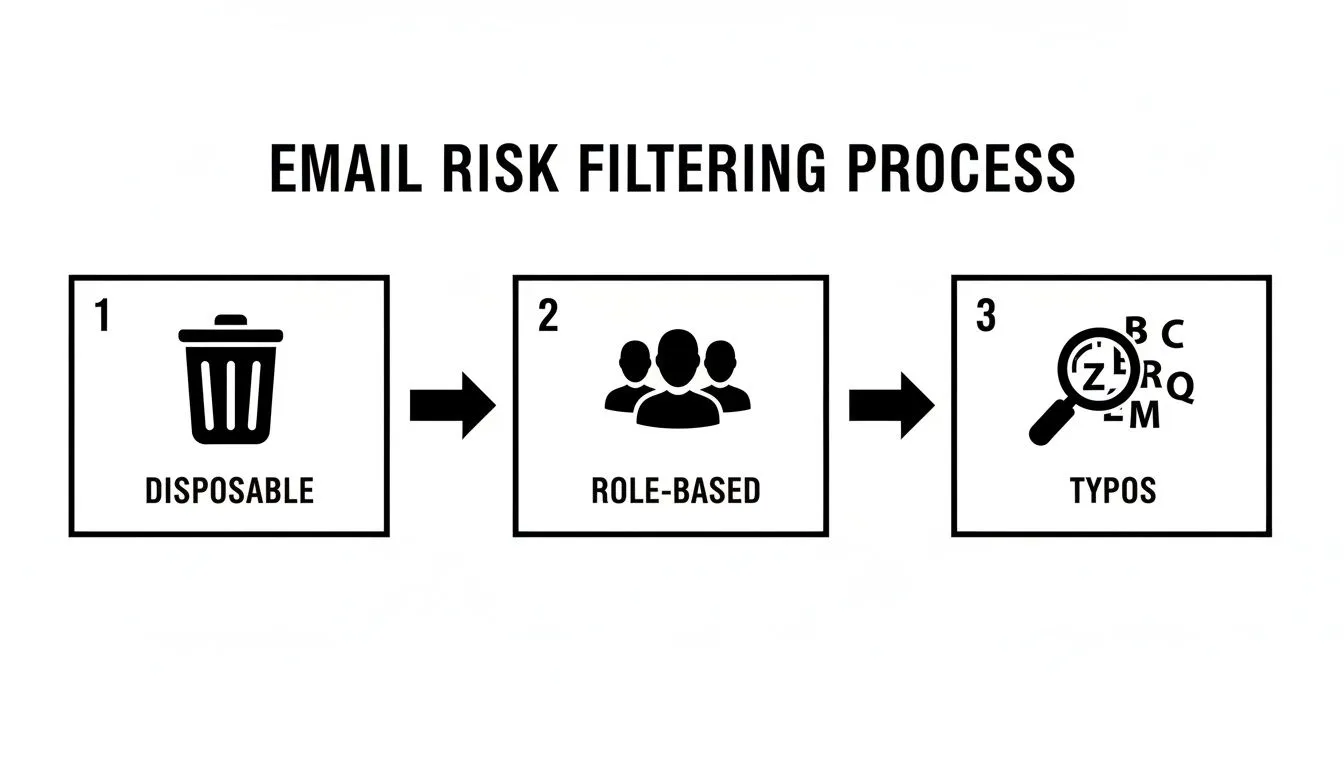
This kind of systematic filtering—getting rid of disposable addresses, generic role-based inboxes, and common typos—is what keeps your sender reputation safe and focuses your team's energy on genuine prospects.
The Strategic Advantage of Automation
This isn't just about saving time; it's a genuine strategic edge. In B2B outbound, bad data can single-handedly destroy a campaign. It’s no coincidence that Europe boasts the highest inbox placement rate globally at 89.1%; strict GDPR rules forced teams to get serious about list hygiene, a practice that's now a global best practice. While the average global bounce rate hovers around 2.48%, I’ve seen unverified lists hit bounce rates of 5-10% or even higher, which is an absolute killer for performance. You can dig deeper into these email marketing trends and benchmarks on verified.email.
By building an automated verification workflow, you’re not just cleaning a list; you're creating a system that guarantees every email sent has the highest possible chance of landing in the right inbox. This protects your sender reputation and maximizes the ROI of every campaign.
Ultimately, integrating these checks into a cohesive workflow frees your team from the soul-crushing work of data hygiene. It lets them do what they were hired to do: build relationships and close deals. To see how this fits into the bigger picture, check out our guide on automating CRM and workflow processes. This is how winning sales teams build a predictable, high-performing pipeline.
Frequently Asked Questions About Email Verification
As you get your hands dirty with email verification, you're bound to have some questions. It's totally normal. Getting this right is less about a single tool and more about building smart, consistent habits. Let's tackle a few of the most common questions I hear all the time.
How Often Should I Verify My Email List?
For any new leads coming in, the answer is simple: verify them immediately. Real-time verification as you capture an email is the only way to go. This stops bounces before they even happen and keeps your sender reputation clean from the very start.
But what about your existing lists? People move on, companies go under, and email accounts get deactivated. In the B2B space, this list decay is surprisingly fast. A good rule of thumb is to give your entire list a deep clean every 3 to 6 months. It's the kind of routine maintenance that pays for itself.
Can I Check if an Email Address Is Valid Without Sending an Email?
Yes, and you absolutely should. That's the whole point of a proper verification process—to find out if an address works before you hit send and risk a bounce.
You can do this in a few ways, all without sending any actual content:
- Syntax Check: A quick, initial pass to make sure the format looks right (like
name@domain.com). - MX Record Lookup: This confirms the domain is actually configured to receive mail in the first place.
- SMTP Handshake: This is the gold standard. Your tool essentially initiates a "conversation" with the recipient's mail server, asking if a specific mailbox exists, and then disconnects. No email is ever sent.
Think of it this way: professional verification lets you knock on the door to see if anyone's home, without ever having to step inside. It gives you the deliverability answer you need while leaving no trace.
What Is the Difference Between a Hard Bounce and a Soft Bounce?
Knowing the difference here is critical for keeping your list healthy. A hard bounce is a dead end. It’s a permanent failure, meaning the email address is invalid, fake, or the domain doesn't exist. You need to remove these from your list the second they happen. No exceptions.
A soft bounce is more of a temporary roadblock. Maybe the person's inbox is full, their company server is down for maintenance, or your email file was too large. While one soft bounce isn't a red flag, if you see an address soft-bouncing repeatedly over several campaigns, it's time to treat it like a hard bounce and remove it.
Are Email Verification Tools Compliant with GDPR?
This is a great question, and the short answer is yes, as long as you work with a reputable provider. The act of verifying the technical status of an email address—just checking if it exists—is widely seen as a legitimate business interest for maintaining data accuracy under GDPR.
These services don't peek into anyone's inbox or handle personal data. They're just pinging a server to see if a mailbox is active. That said, the responsibility is still on you. Make sure you choose a verification partner that is upfront about their data processing and clearly states their GDPR compliance. Always do your homework.
Ready to stop wasting time on bad leads and start building a predictable pipeline? Starnus is your AI employee for sales, autonomously handling everything from lead generation and enrichment to multichannel outreach. Let Starnus build and verify your lead lists, so your team can focus on what they do best: closing deals. Explore how at https://starnus.com.
Ready to automate your outbound sales? Try Starnus and let AI handle prospecting, outreach, and follow-ups while you focus on closing deals.