So, you've found the perfect prospect on LinkedIn. Now what? The most direct way to get their attention is to land in their inbox. You can find someone's email by manually checking their profile's 'Contact Info', hunting for clues in their bio, or using an email finder tool to pull their data automatically. Honestly, the best results come from combining all three.
Why LinkedIn Is Your Goldmine for B2B Emails
Before we get into the nitty-gritty, let’s be clear on why LinkedIn is the place to start for any B2B prospecting. It's not just another social media site; it’s a massive, constantly updated database of professionals. For sales and marketing folks, that’s pure gold.
Sure, you can send a connection request or an InMail, but the real goal is to move the conversation off the platform and into a channel you control—their email. Email gives you a direct, personal line of communication, away from the noise and character limits of LinkedIn’s messenger.
The Numbers Behind the Network
The data doesn't lie. LinkedIn's visitor-to-lead conversion rate is an impressive 2.74%. That absolutely crushes other platforms like Facebook (0.77%) and Twitter (0.69%), making it the most effective social channel for B2B lead generation by a long shot.
But all that traffic is useless if you can't follow up. This is where a good email becomes your key.
For example, a solid enrichment tool like Apollo.io can instantly match a LinkedIn profile to its database and verify an email address, successfully finding 73 out of 100 emails on average. When you combine LinkedIn DMs with a strong email follow-up, you can see response rates jump to 10.3%—more than double what you’d get from cold email alone.
Your Strategic Roadmap
This guide isn't just a list of tricks; it’s a complete roadmap for turning LinkedIn profiles into real sales opportunities. We'll walk through the entire process, from manual sleuthing to full-blown automation.
Here's what we're going to cover:
- Manual Discovery: How to find emails with just your browser and some clever detective work.
- Tool-Driven Enrichment: Using powerful email finders to get contact info in seconds, and at scale.
- Ethical Outreach: Writing personalized, compliant messages that actually get replies.
- Full Automation: Tying it all together into an automated system that keeps your pipeline full.
To give you a bird's-eye view, here's a quick breakdown of the main methods we'll discuss. Each has its pros and cons, depending on your goals and resources.
Email Finding Methods at a Glance
| Method | Typical Accuracy Rate | Effort Level | Best For |
|---|---|---|---|
| Manual Profile Check | High | Low | Finding emails for a few key contacts quickly. |
| Google Search Operators | Medium | Medium | Uncovering publicly listed emails on other sites. |
| Email Permutator Tools | Low to Medium | Medium | Guessing and testing common email patterns. |
| Email Finder Tools | High | Low | Bulk enrichment and finding verified emails fast. |
Choosing the right method is about balancing speed, accuracy, and cost. While manual checks are great for one-off searches, tools are essential for scaling up your outreach.
The real objective isn't just to hoard a list of emails. It's to kick off genuine conversations that grow into valuable business relationships.
By following a structured process, you take the guesswork out of prospecting and start executing a proven strategy. For a deeper dive, check out this practical outreach guide on finding someone's email from LinkedIn. And if you're serious about making the most of the platform, our post on LinkedIn activity monitoring shows you how to add a powerful analytics layer to your prospecting.
How to Find Emails Manually (Without Paying for Tools)
Before you reach for your wallet and sign up for a paid service, it’s worth trying a bit of good old-fashioned digital detective work. Honestly, learning how to find an email address manually is a critical skill, especially when you only need to connect with a handful of people. It's the perfect approach for scrappy founders or any sales pro working with a tight budget.
So, where do you start? The lowest-hanging fruit is always the person’s profile itself. You'd be surprised how many people openly share their contact details to encourage new opportunities.
Start With the Profile Clues
First, head over to your prospect’s LinkedIn page and look for the “Contact Info” link, which sits right below their name and headline. If you’re a first-degree connection, their email might just be listed there. This is the easiest win, but it’s completely dependent on that person's privacy settings.
If that’s a dead end, your next stop should be their About section. I’ve found this to be a goldmine that many people skip over. Professionals, particularly consultants and founders, often drop their email address at the very end of their summary with a direct call to action. Keep an eye out for phrases like "Feel free to reach out at..." or "For inquiries, contact me via..."
Finally, give their profile a quick scan for a personal website or portfolio. Clicking through to their site can lead you straight to a contact page or an email listed in the footer. If you want to dig even deeper into this hands-on approach, there are plenty of other proven strategies to find business email addresses you can try.
The Art of the Educated Guess
Alright, so the profile came up empty. Don't worry, your next move is to make a well-informed guess. The good news is that most companies use a standardized format for their emails, which makes them highly predictable.
You just need two key pieces of information:
- The person’s full name (let's say, Jane Doe).
- Their company's domain (for example,
company.com).
With these two details, you can start building a list of the most common email patterns. This method works far more often than you might think.
Pro Tip: Whatever you do, don't just guess and start blasting emails. A high bounce rate is a red flag that can seriously damage your domain's sending reputation. Always, always run your guesses through a free email verification tool first.
Let's say you're trying to reach Jane Doe, who works at Acme Corp (acme.com). You'd want to test the most common combinations:
-
jane.doe@acme.com -
jdoe@acme.com -
janed@acme.com -
jane@acme.com
Simply copy and paste these into a free email verifier. The tool will quickly tell you which one is valid, giving you the green light to send your message without risking a bounce.
Using Email Finder Tools for Speed and Scale
Let's be realistic. While finding an email address manually is a solid skill, it just doesn’t work when you need to scale up. If you're looking to enrich a list of 500 prospects from Sales Navigator, you can't afford to spend hours on each one. This is exactly where email finder tools and browser extensions come in, letting technology do the heavy lifting for you.
Most of these tools work right inside your browser. After a quick install, they usually add a small button or overlay directly onto LinkedIn profiles. With a single click, you can uncover a prospect's email address, turning what was once a time-consuming guessing game into a simple, efficient part of your workflow.
Individual Profile vs. Bulk Enrichment
Email finders aren't a one-size-fits-all solution. They generally come in two flavors: those built for grabbing single emails on the fly and more powerful platforms designed for enriching entire lists at once.
- Individual Profile Finders: These are typically Chrome extensions that live on a person’s LinkedIn page. They’re perfect for account executives or anyone targeting a handful of key decision-makers who need contact info now.
- Bulk Enrichment Platforms: Think of these as the heavy machinery. You can upload a CSV of prospects or even connect a LinkedIn Sales Navigator search, and the platform will find and verify emails for the whole list. This is the go-to for SDR teams building out large-scale outreach campaigns.
I've seen firsthand how big of a difference this makes. Picture an SDR with a perfectly curated list in Sales Navigator. Using a tool like Saleshandy Connect, which in 2026 tests found 95 out of 100 emails correctly from LinkedIn profiles, is a game-changer. That's not just a statistic—it’s the difference between a silent inbox and a pipeline humming with new conversations.
When you consider that manual guessing often tops out at 40-50% accuracy, it’s no surprise that adding verified emails into the mix can boost multichannel conversions by as much as 250%. For a deeper dive into these numbers, the 2026 report on top LinkedIn email scrapers is worth a read.
Choosing the Right Tool for Your Needs
With a market full of options, picking the right email finder comes down to your team’s specific goals, size, and budget. It’s a crowded field, so comparing what different B2B data providers offer is a critical step before you commit. Our detailed guide on the best B2B data providers like ZoomInfo and Apollo is a great resource to help you sort through the noise.
As you look at different tools, here are a few things I always tell teams to focus on:
- Accuracy: What percentage of the emails it finds are actually valid? Anything below 90% is a red flag and can lead to high bounce rates that will tank your sender reputation.
- Integrations: Does it play well with your existing CRM and sales engagement platform? A smooth integration saves countless hours of mind-numbing data entry.
- Data Sources: How does the tool actually find and verify emails? Look for a mix of proprietary data, public sources, and, most importantly, real-time verification.
- Pricing: Is it based on credits, a flat monthly subscription, or a per-user fee? Make sure the cost structure makes sense for how your team will actually use it.
To give you a head start, here’s a quick comparison of some of the leading tools out there.
Top LinkedIn Email Finder Tools of 2026
This table breaks down some of the top-performing email enrichment tools, focusing on what makes each one stand out for sales teams.
| Tool Name | Key Feature | Reported Accuracy | Best for... |
|---|---|---|---|
| Saleshandy Connect | High accuracy with a free starter plan | 95% | SDRs and teams needing reliable data without a huge initial investment. |
| Kaspr | Real-time verification & strong CRM integrations | 92% | Teams that want seamless data flow into platforms like HubSpot or Salesforce. |
| Hunter.io | Bulk domain search and author finder | 90% | Content marketers and link builders finding contacts at specific companies. |
| Apollo.io | All-in-one sales intelligence platform | 89% | Sales teams looking for a single tool for prospecting, engagement, and analytics. |
Ultimately, choosing a tool comes down to what will best support your team's existing process.
A great email finder doesn’t just give you data; it gives you confidence. When your team trusts that their emails are accurate, they can stop worrying about bounces and start focusing on what they do best: crafting great messages and starting valuable conversations.
Crafting Outreach That Actually Gets Replies
So, you’ve got the email. That’s a great start, but it’s only half the job. The real trick is turning that contact information into a genuine conversation, and that means avoiding the spam folder at all costs.
This is where you need a smart outreach strategy. The goal isn't just to get your email opened—it's to get a response. And that starts with making the other person feel like you've singled them out for a good reason, not just because they're another name on a spreadsheet.
Go Deeper Than a First Name
Let's be honest, Hi [First Name], isn't fooling anyone. True personalization is about connecting on a human level, and you can find everything you need with a quick two-minute scan of their LinkedIn profile.
Before you write a single word, look for these conversation starters:
- Recent Activity: Did they share an interesting article or comment on a post? Reference it. Something as simple as, "Your recent post on AI in sales really got me thinking..." shows you're paying attention.
- Shared Connections: A mutual contact is an immediate trust-builder. "I noticed we're both connected with Jane Smith" can instantly warm up a cold email.
- Company Milestones: Nothing works better than a timely, relevant hook. "Huge congrats on the Series B funding your team just announced!" is a perfect opener.
This isn't about being nosy; it's about showing you’ve invested a little time and genuinely respect their work. It shifts the entire dynamic from a cold pitch to a relevant conversation.
The Multi-Touch Warm-Up
Sending one email and hoping for the best is a losing game. A far better approach is to warm up your contact with a multi-touch sequence, blending a little LinkedIn engagement with your email outreach. This makes you a familiar face before your email even lands in their inbox.
Here’s a simple, powerful sequence that works wonders:
- Engage on LinkedIn: First, find a recent post of theirs and leave a thoughtful comment or a simple like.
- Send a Connection Request: A day or so later, send a personalized connection request. Mention your shared interest or the post you just engaged with.
- Send the Email: After they've seen your name twice, send your email. You can even use a subject line like, "Following up from LinkedIn," to tie it all together.
This simple strategy plays on the psychology of familiarity. When they see your email, it’s not from a total stranger. It’s from that person they just saw on LinkedIn. In fact, teams often see 93% higher acceptance rates on personalized connection requests alone, which paves the way for your email to get a much warmer reception.
The point isn't to bombard someone from all sides. It's about creating a gentle, persistent presence that shows you're a professional who has done their homework.
Stay Compliant and Respectful
Let's be clear: effective outreach is always ethical. When you're finding and using emails for business, you have to play by the rules, especially with regulations like GDPR in Europe and the CAN-SPAM Act in the U.S.
Here’s what you absolutely must do:
- Provide a Clear Opt-Out: Every single email needs an obvious and easy way for people to unsubscribe. No exceptions.
- Be Transparent: Your "From" name, subject line, and the body of your email can't be misleading. Be upfront about who you are and why you're writing.
- Honor All Requests: If someone asks you to stop contacting them, you need to remove them from your list immediately.
While cold email definitely still has its place, it's worth noting the numbers. LinkedIn InMail often sees 18-25% response rates, which already blows the typical 1-5% from cold email out of the water. But when you add the kind of personalization we just talked about, those response rates can jump by 4-5x. You can explore more benchmarks and insights on LinkedIn engagement on LeadLoft.com.
Automating Your LinkedIn Prospecting Engine
Alright, we’ve covered the manual detective work, the tools that do the heavy lifting, and how to write an email that actually gets a response. But doing all that one by one is a surefire way to burn out. The real magic happens when you connect those pieces into an automated engine that runs in the background.
This is how you stop hunting for individual emails and start building a predictable pipeline.
Imagine setting your Ideal Customer Profile (ICP) just once. From that point on, a system finds prospects on LinkedIn, uncovers and verifies their work emails, and even drafts personalized outreach for your team to review. This isn't science fiction—it's what modern sales automation can do right now.
Building a Scalable Sales Machine
The whole point of this is to get your sales team out of the data-entry business and back into the business of having valuable conversations. Instead of the tedious copy-and-paste routine between LinkedIn, an enrichment tool, and your CRM, a single, integrated workflow handles everything.
You immediately eliminate the mind-numbing task of manual data entry, which is not just slow but a prime source of costly errors.
Even better, you get total consistency. An automated system doesn't have off days. It never forgets to send a follow-up, never overlooks a promising lead, and can flawlessly execute multi-channel sequences that combine LinkedIn messages and emails. If you want to dig deeper into how these components connect, our guide on integrating your CRM and workflow automation is a great resource.
How an Autonomous System Works
It’s helpful to think of it as hiring a dedicated AI agent for your sales team. This is exactly how a platform like Starnus operates, using specialized AI agents that work in concert to power your entire outbound strategy.
Here’s what that looks like in practice:
- Lead Generation: An agent scans LinkedIn, pinpointing prospects that perfectly match the ICP you've defined.
- Enrichment: It then goes to work researching those prospects to find and, crucially, verify their professional email addresses.
- Outreach: Another agent steps in to write personalized drafts, referencing details from the prospect's LinkedIn profile to make the message relevant.
- Execution: Finally, the system launches a pre-approved sequence across multiple channels, tracking opens, clicks, and replies to flag anyone who shows interest.
This diagram shows how these core principles work together to create an outreach flow that actually gets results.
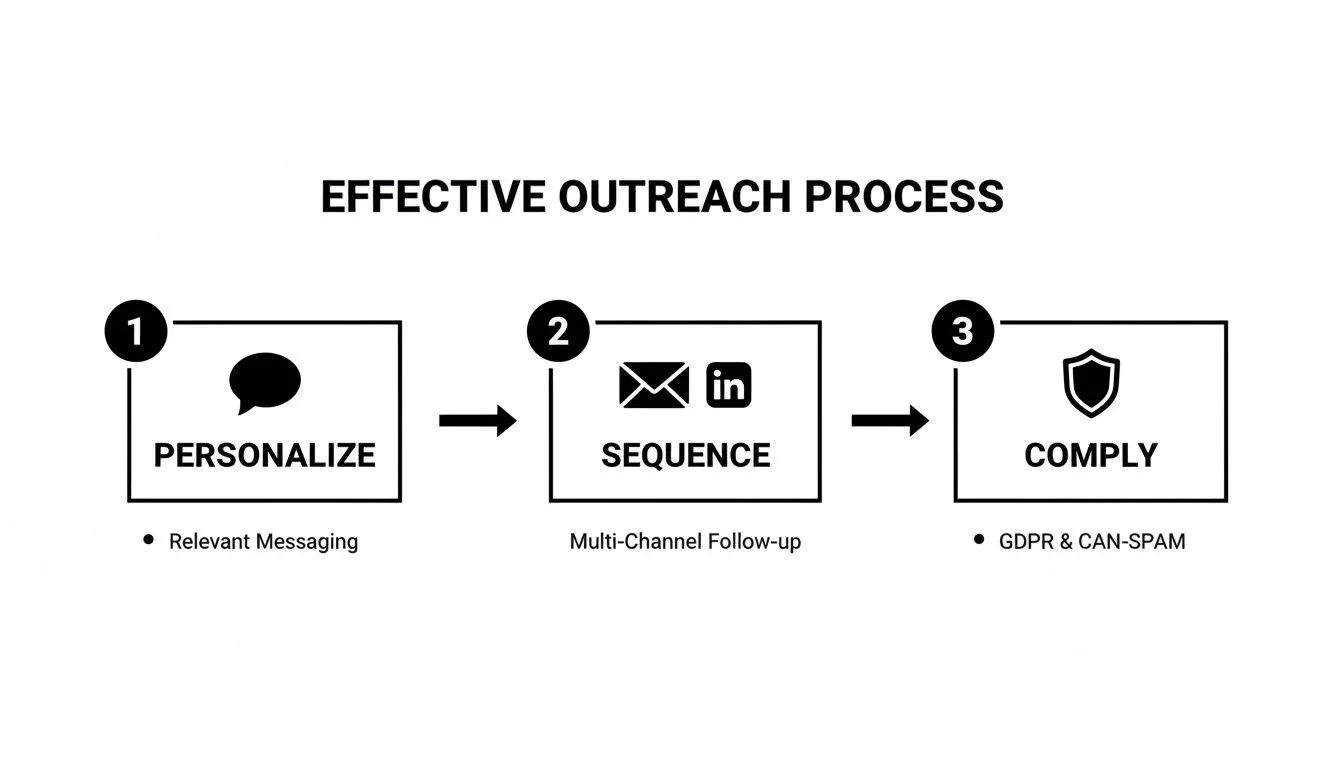
Each step is critical. Personalization makes your sequence stand out, and strict compliance ensures your outreach is both ethical and sustainable for the long haul.
The real goal of automation isn’t just about speed. It’s about being smarter and more consistent at scale. By automating the grunt work of finding emails on LinkedIn and knowing what to do next, you build a predictable, scalable machine for generating qualified leads.
The outcome? Your sales reps can log in each morning to find their calendars filling up with meetings and their inboxes full of replies from people who are actually interested. All that, without them ever having to do the initial prospecting themselves.
Frequently Asked Questions
When you start digging for emails on LinkedIn, a few key questions always pop up. Let's tackle them head-on so you can move forward confidently and, more importantly, correctly.
Is It Legal to Find and Use Someone's Email from LinkedIn?
This is the big one. The short answer is yes, it’s generally legal for B2B outreach, but the long answer is that you have to be smart and ethical about it.
The whole game hinges on respecting privacy laws like GDPR and CAN-SPAM. Think of it less as digging for private data and more as opening a professional line of communication. As long as you stick to a few non-negotiable rules, you’ll be on the right side of the law.
- Make it relevant. Your outreach should offer genuine, professional value to the person you're contacting. No spamming.
- Give them an out. Every single email must have a clear, easy-to-find unsubscribe link.
- Respect their choice. If someone opts out, you have to honor that request immediately. No exceptions.
As long as your intentions are professional and you remain transparent, you're not crossing any lines.
What Is a Good Email Verification Accuracy Rate?
Chasing a 100% accuracy rate is a fool's errand—it simply doesn't exist. Email lists degrade, people change jobs, and servers have weird rules.
A truly great tool will hit a 90-95% accuracy rate. Anything less than that, and you're going to see your bounce rate creep up, which is a major red flag for email providers and can tank your sender reputation.
You'll also run into "catch-all" servers. These are domains configured to accept any email sent to them, so a verification tool can't be sure if john.doe@company.com is a real inbox or not. When a tool flags an address as a catch-all, treat it with a bit of caution. It's not a guaranteed bounce, but the risk is slightly higher.
Can My LinkedIn Account Get Banned for Using These Tools?
It’s a valid fear, and the answer depends entirely on the type of tool you use. Your LinkedIn account is absolutely at risk if you use sketchy automation bots or scrapers that hammer the platform in a way that violates their Terms of Service. LinkedIn's algorithms are smart and designed to sniff out this kind of aggressive, unnatural activity.
The real danger comes from tools that act like clumsy robots. To stay safe, choose established platforms that integrate responsibly, often through APIs, instead of just scraping data.
Here’s how to keep your account out of the penalty box:
- Never use a tool that asks for your LinkedIn password. That’s a massive red flag.
- Work like a human. Don't try to view 1,000 profiles or export thousands of contacts in an hour.
- Stick with reputable, well-known email finders that openly discuss compliance.
Use trusted tools and a bit of common sense, and you’ll find the emails you need without ever putting your account in jeopardy.
Ready to stop manually hunting for emails and build a predictable sales pipeline? Starnus provides an AI-powered sales "employee" that automates your entire outbound engine, from finding verified emails on LinkedIn to launching personalized outreach sequences. Turn prospecting into a self-sustaining machine and let your sales team focus on what they do best: closing deals. Learn more and get started at https://starnus.com.
Ready to automate your outbound sales? Try Starnus and let AI handle prospecting, outreach, and follow-ups while you focus on closing deals.