Let's be honest, trying to run a modern sales team without connecting your CRM and workflow tools is like trying to build a house with a hammer and no nails. It's just not going to work. We're past the point where this is a "nice-to-have." It’s now the core solution for stamping out manual data entry, losing critical lead context, and stopping those inconsistent follow-ups that quietly kill your deals.
Why Smart CRM and Workflow Integration Is No Longer Optional

Forget the textbook definitions for a moment. The real conversation isn’t about what these tools are, but why connecting them is so vital. When your systems are disconnected, it creates a thousand tiny frustrations that add up to massive problems for everyone from your SDRs to your RevOps leaders.
It’s the pain of a rep manually copying and pasting data from a spreadsheet into the CRM. It’s the context that vanishes when a hot lead gets handed from an SDR to an Account Executive. It’s the promising deal that goes cold simply because a follow-up task fell through the cracks.
A well-built ecosystem, founded on smart CRM and workflow automation, tackles these issues head-on. It turns your CRM from a glorified, passive address book into an active, intelligent partner that actually helps drive the sales process forward.
The Old Way vs. The Smart Way
The difference between a manual sales process and an automated one is night and day. The old way drains your team's energy and is riddled with errors, while the new way builds momentum and creates real efficiency.
To really see the difference, let’s compare some common tasks:
Manual Sales Tasks vs Automated CRM Workflow
| Sales Activity | Manual Process (The Old Way) | Automated Workflow (The Smart Way) |
|---|---|---|
| New Lead Entry | Rep manually creates a new contact, copies/pastes info, and logs the source. (5-10 min) | Lead is automatically created from a web form, enriched with data, and assigned. (Instant) |
| Follow-Up Tasks | Rep finishes a call, then has to remember to manually create a follow-up task. (2-5 min) | After a call is logged, the workflow automatically creates the next task based on the outcome. (Instant) |
| Lead Nurturing | Rep sends one-off emails, hoping to stay top-of-mind. Sporadic and inconsistent. (Time varies) | Lead is automatically entered into a tailored email/LinkedIn sequence. (0 min of rep time) |
| Updating Deal Stage | Rep moves a deal in the pipeline but forgets to update related fields or notify the team. | Moving the deal stage automatically updates forecasting data and sends a Slack alert. (Instant) |
Looking at this, it's clear how much time is wasted on tasks that a machine can handle perfectly. This isn't just about saving a few minutes here and there; it's about fundamentally changing where your team focuses its energy.
The goal is simple: Stop forcing your team to work for the CRM and start making the CRM work for your team. Automation is the bridge that gets you there.
This shift isn't just for convenience—it's about survival. The global CRM market is projected to skyrocket past $53 billion by 2026, driven by this very demand for intelligent workflow orchestration. A staggering 98% of users now expect their CRM to manage workflows for contacts and pipelines. Yet, the challenge remains huge, with 50% of integration projects failing due to coordination gaps.
The Real-World Impact of Integration
A huge part of modern sales operations is Mastering Integration in Salesforce CRM or any other platform to make sure data and processes flow without friction.
Think about it. Instead of an SDR logging a call, then manually creating a task for the next step, a workflow handles it instantly. The call is logged, the lead score is updated, and the next-step task is assigned before the rep even hangs up.
This level of automation delivers some powerful benefits:
- Slashes human error: No more typos in contact records or forgotten follow-ups.
- Increases speed to lead: You can engage new leads in minutes, not hours, which is a massive competitive advantage.
- Improves data hygiene: The CRM stays clean and reliable without someone having to spend their Friday afternoon on cleanup duty.
- Frees up your reps: Most importantly, your team can finally focus on building relationships and closing deals—not on administrative busywork.
By connecting your systems, you're creating a powerful, self-reinforcing loop. Every action is tracked, every process is efficient, and every opportunity gets the attention it deserves.
Map Your Sales Process Before You Automate Anything
Diving headfirst into CRM and workflow automation without a solid plan is a classic mistake. I’ve seen it happen time and again: teams get excited about a new tool, start building workflows, and end up with a digital mess that’s even harder to untangle than their old manual process. You can't just automate chaos; you'll only get faster chaos.
Before you touch a single automation rule, you need to get your existing sales process down on paper. I’m not talking about some high-level theory. I mean a concrete, nitty-gritty blueprint of how your team actually sells right now. This document becomes the foundation for everything you build.
Defining Your Sales Stages
The first thing to get straight is the major milestones in your sales cycle. These are your pipeline stages. The key here is to keep it simple and focused on moments that represent real, tangible progress with a prospect.
For a typical B2B SaaS company doing outbound, the stages often look something like this:
- Lead In: A new account that fits our ideal customer profile is identified and popped into the CRM.
- Contacting: An SDR is actively running an outreach sequence—think emails and LinkedIn messages.
- Engaged: This is a big one. The prospect has actually replied or shown legitimate interest.
- Meeting Booked: A discovery call or demo is officially on the calendar.
- Proposal Sent: The AE has put together and delivered a formal proposal.
- Negotiation: We're in the final stretch, discussing terms and hammering out the details.
Of course, your stages will be unique to your business. What matters is that everyone on the team agrees on what each stage means and when a deal belongs there.
Identifying Triggers and Data Points
With your stages defined, the next piece of the puzzle is identifying the specific triggers that move a deal from one stage to the next. A trigger isn't a gut feeling; it's a clear, objective event. For instance, a deal can’t be moved to "Meeting Booked" until a calendar invite has actually been accepted. No exceptions.
At the same time, you need to figure out what critical data has to be collected at each stage. What information is absolutely essential to have before the deal can progress? What do you need for accurate reporting down the line?
This visual really helps clarify how these three components—Stages, Triggers, and Data—all fit together to create a reliable process map.
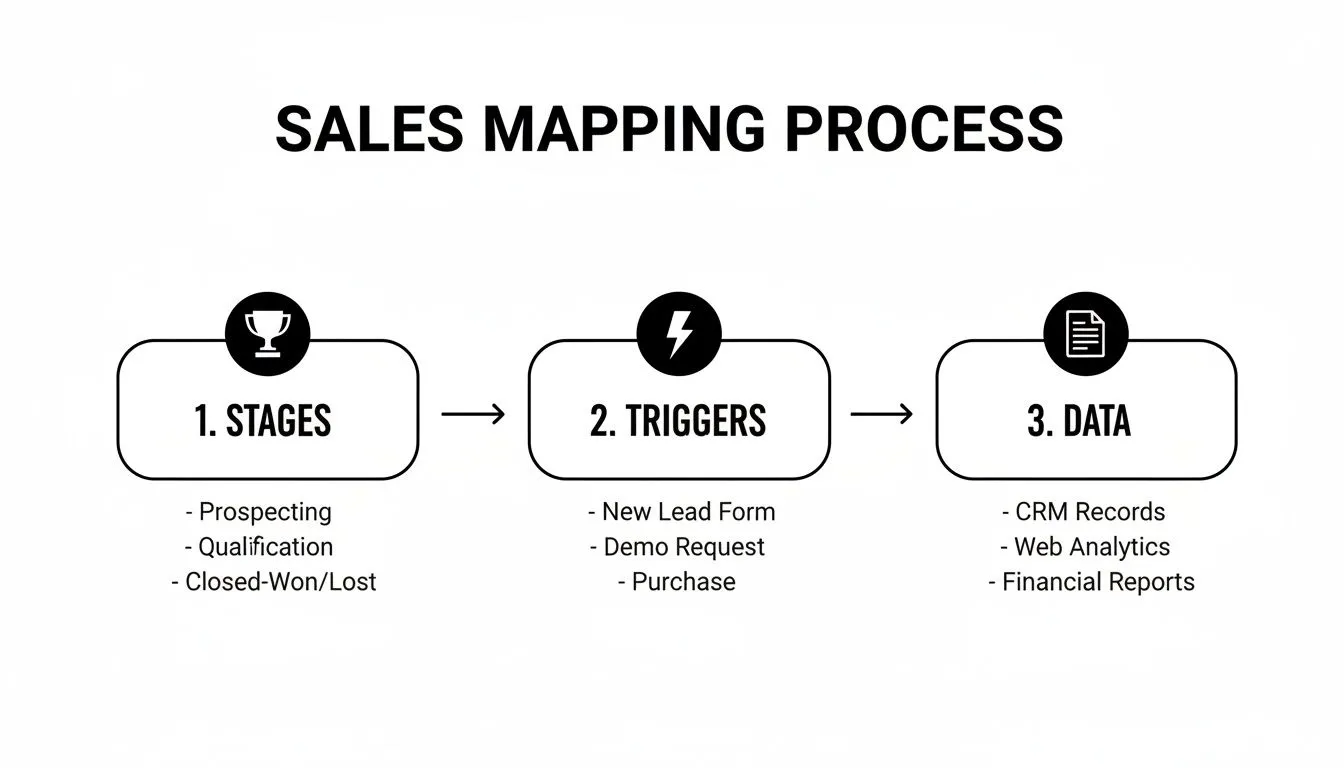
As you can see, a specific trigger unlocks the next stage, which in turn requires certain data points to be captured before you can move on again. It creates a logical flow.
Let's walk through a quick, real-world scenario. Picture an SDR at that same B2B SaaS company working a promising lead.
Scenario: An SDR moves a prospect from "Engaged" to "Meeting Booked." Trigger: The prospect accepts the Google Calendar invite for a demo. Required Data: The SDR must log the confirmed meeting date and time, add the contact's exact job title, and update the "Pain Point" field in the CRM with notes from their email exchange.
This level of detail isn't just nice to have; it's non-negotiable. It's what ensures your crm and workflow automations are built on a solid, logical framework.
Trying to build automation without this map is like flying blind. Your workflows will lack context, they'll break, and they won't actually help your team sell more. If you want to take this a step further and really nail down the operational side of your sales engine, understanding the core principles of sales ops is a great place to start. You can explore what sales ops entails in our detailed guide. This foundational work is what prevents you from simply putting a broken process on autopilot and instead sets your team up for genuine, scalable growth.
Building High-Impact Automated Workflows in Your CRM
This is where the rubber meets the road. You’ve got your sales process mapped out on paper, and now it's time to bring it to life inside your CRM. Think of this as setting up a series of smart dominoes—one action reliably triggers the next, creating a chain reaction that keeps your pipeline moving.
At the heart of any automation is a simple but powerful idea: if this happens, then do that. This "if-this-then-that" logic is the engine that drives your workflows. You just need to define a trigger (the "if") and tell the system what to do next (the "then").
This synergy between CRM and workflow is why the global workflow management system market is expected to surge from $22.3 billion in 2026 to an incredible $70.9 billion by 2032. It’s no surprise that 98% of CRM buyers consider workflow management a critical feature.
From Theory to Action
So, how do you translate those sales map scenarios into actual rules? Most CRMs have a visual workflow builder that lets you do this without touching a single line of code.
Here are a couple of real-world examples I see all the time:
- Rule 1: New Lead Follow-Up
- IF a new lead is created and their source is "Website Demo Request"...
- THEN the system instantly creates a task for the assigned SDR. The task might be named "Call new demo request: [Lead Name]" and be due by the end of the day.
- Rule 2: Meeting Booked Celebration
- IF a deal stage gets updated to "Meeting Booked"...
- THEN a notification is automatically sent to your team's #sales-wins Slack channel. Something like, "Boom! Meeting booked with [Company Name] by [SDR Name]!"
These small, automated steps ensure no lead falls through the cracks and keep the whole team motivated without anyone having to send a manual update.
An effective automated workflow doesn't just complete a task; it carries the context forward. It knows why it's acting and what needs to happen next, creating a chain of intelligent events.
Autonomous Agents and Data Enrichment
Modern automation can do so much more than just fire off notifications. This is where autonomous AI agents, like the ones we've built at Starnus, really change the game by handling complex, multi-step tasks.
Imagine a workflow that doesn't just create a new lead but also preps it for your sales team.
For instance, when a new lead hits your CRM, an AI agent can be triggered to:
- Scrape LinkedIn to verify the prospect's current job title and company.
- Check company data using tools like Clearbit or ZoomInfo to pull firmographics like company size and industry.
- Update the CRM by automatically populating all these new fields in the contact record.
This means your reps get a rich, complete profile before they even pick up the phone. A great first step is exploring the different workflow automation software platforms to see the full range of what's possible.
This level of intelligent automation is what turns a CRM from a static database into a living, self-updating system. Starnus agents are built for this, functioning as true end-to-end outbound agents that can handle everything from prospect research to updating your records.
The ultimate goal is to build a system where manual data entry becomes a thing of the past. This frees your team to focus exclusively on what they do best: building relationships and closing deals.
Integrating Multichannel Outreach into Your CRM Workflow

Let's be realistic: your sales team isn't glued to their CRM screens all day. They're sending emails, firing off LinkedIn messages, and jumping on calls. This creates a disconnect, and before you know it, your CRM is stale—a ghost town of outdated information.
The only way to fix this is to create a closed-loop system. You need a setup where every single touchpoint, whether it's an email or a LinkedIn comment, automatically flows back into your central database. This isn't just about keeping things tidy; it's about building a smarter, more agile CRM and workflow that actually helps you sell.
Creating a Single Source of Truth
Think about how this works in practice. An SDR sends a LinkedIn connection request using their favorite outreach tool. Instead of that action vanishing into the void, it should instantly trigger a workflow that tags the contact in your CRM as "Contacting - LinkedIn."
A few days later, the prospect accepts and sends a reply. Boom. Another workflow logs the message and updates their status to "Engaged."
This creates a powerful feedback loop. Your team’s outreach activities trigger updates in the CRM, and the fresh data in the CRM then helps personalize the very next touchpoint. This seamless flow is the absolute key to maintaining a single source of truth.
Getting this set up means your CRM must talk directly to your sales engagement tools. Most modern platforms have native integrations or can be linked using third-party connectors like Zapier. The process usually breaks down like this:
- Connect Your Accounts: First, you’ll need to authenticate your email client (like Gmail or Outlook) and LinkedIn accounts with your CRM.
- Map Your Activities: Next, define how actions from other platforms are logged. For instance, a sent email should appear as a "Logged Email" on the contact's activity timeline.
- Configure Triggers: Finally, set up rules that watch for specific events, like an email open or a link click, so the system knows when to kick off an automation.
Automating Cross-Channel Actions
Once your tools are synced, the real magic begins. You can now build powerful cross-channel workflows where a prospect's behavior on one platform triggers an entirely different action on another. This is how you orchestrate a truly coordinated outreach strategy.
Here’s a practical scenario we see all the time. A high-value prospect on your "Engaged" list clicks a link in your email but goes dark and doesn't reply. Instead of just letting them go cold, you can build a workflow that automatically takes action.
Cross-Channel Workflow Example
| Trigger (The "If") | Action 1 (The "Then") | Action 2 (The "Then") |
|---|---|---|
| Contact clicks an email link but doesn't reply within 24 hours. | Create a high-priority task for the SDR to send a personalized LinkedIn message. | Add the contact to a "Warm Leads" audience for a future retargeting ad campaign. |
This kind of automated coordination makes sure you’re engaging prospects in the right place, at the right time, based on what they're actually doing. For teams looking to really dial in their social selling, you can learn more about automating LinkedIn outreach effectively in our guide.
Your CRM shouldn't just be a dusty archive of past events. It needs to be the central nervous system of your entire outreach engine, orchestrating every move across every channel.
This level of integration elevates your CRM and workflow from a simple record-keeper into a proactive sales machine. Every action feeds the system with new data, and that data fuels smarter, more effective actions down the line. It's how top-performing teams scale their outreach without letting good opportunities fall through the cracks.
Using Smart Alerts to Monitor Workflow Performance
Rolling out an automated sales process is never a "set it and forget it" project. I've learned from experience that the best automations require constant oversight. This is where your CRM and workflow system can truly shine, moving beyond a simple database to become an active partner in managing your pipeline.
It starts with using your CRM dashboards to track more than just basic reports. You need a finger on the pulse of your most critical workflow metrics—things like conversion rates between stages, how long a deal sits in each phase, and the task completion rates for your team.
This demand for real-time visibility is a huge reason the CRM market is projected to hit $334.48 billion by 2026. And while 47% of users see a major boost in customer satisfaction, a staggering 50% of CRM projects fail because of poor coordination. This just underscores how vital continuous monitoring really is. You can dig deeper into these CRM market trends and their implications to see the full picture.
Building Workflows That Monitor Workflows
This is where the real magic happens. You can actually build automation rules designed specifically to watch your process and flag issues long before they turn into full-blown problems. Think of it as creating a safety net that alerts you the moment something goes sideways, letting you step in with precision.
For instance, a high-value lead that’s gone cold is a classic red flag. You can create a workflow to tackle this head-on:
- IF a deal is worth over $10,000 and has been stuck in the "Proposal Sent" stage for more than 7 days...
- THEN automatically trigger an alert to both the sales manager and the assigned Account Executive. The notification could say: "High-value deal for [Company Name] is stalled. Follow up required."
A simple rule like this ensures your most valuable opportunities never fall through the cracks of a busy pipeline.
The goal is to make your CRM your most vigilant team member—one that never takes a break and instantly spots bottlenecks, stuck deals, and potential performance issues.
Proactive Management with Smart Flags
You can apply the same logic to managing your team's workload and performance. An SDR drowning in tasks is an SDR who can't possibly perform at their peak.
Here’s another practical alert I’ve seen work wonders for task management:
- Trigger: An SDR’s open task count climbs past 50.
- Action: A notification fires off to their manager, flagging that the rep's workload is getting dangerously high and might need to be redistributed or reprioritized.
By setting up these kinds of smart alerts, you're not just automating tasks; you're automating oversight. Your CRM becomes an active partner that helps you manage your team, fine-tune your sales process, and make sure your entire crm and workflow engine is running at peak efficiency.
Answering Your Top Questions About CRM and Workflow Automation
Whenever teams start talking about automating their sales process, the same few questions always pop up. It's one thing to understand the theory, but making it work in the real world brings up some practical concerns. Let's walk through the big ones I hear most often.
How Much Is Too Much Automation?
This is the big one. Everyone gets excited about the possibilities, but the goal isn't to automate everything. The real win comes from automating the right things.
My advice is always to start small. Look for the high-volume, low-value administrative tasks that are eating up your team's day.
Think about the repetitive stuff, like:
- Lead assignment: Instead of a manager manually handing out leads, the system can instantly route them to the right person based on territory or specialty.
- Task creation: A call is logged, and a follow-up task for two days later is automatically created. An important email is sent, and a task to check for a reply appears on the rep’s to-do list.
- Data entry: No one should be manually updating a "Last Contacted Date." Your CRM should handle that the moment an activity is logged.
The sweet spot is freeing up your reps from the machine so they can have better conversations with humans. Don't try to automate nuanced, relationship-building activities. An automated "just checking in" email can feel robotic and do more harm than good.
Is Automation Going to Make My Team Obsolete?
I get this question from sales leaders who are worried about team morale, and it's a valid concern. But the fear is almost always misplaced. Good automation doesn't replace skilled salespeople; it makes them better at their jobs.
By having your crm and workflow system take over the mind-numbing admin work, you’re allowing your team to operate at a much higher level.
Imagine what your best reps could do with an extra five or ten hours a week. Instead of cleaning up data or logging tasks, they’re spending that time crafting killer proposals, running deeper discovery calls, and actually building rapport with prospects. It elevates their role from a data entry clerk to a strategic advisor.
How Do I Know If My Workflows Are Actually Working?
You can't manage what you don't measure. Setting up automation without tracking its impact is like flying blind. Before you roll anything out, you need to establish clear benchmarks so you can see what’s changing.
Here are the metrics I tell every team to watch closely.
Key Performance Indicators for Your Workflows
| Metric | What It Really Tells You | A Realistic Goal |
|---|---|---|
| Time-to-First-Contact | How fast you jump on a new lead. Speed is everything here. | Get this down from 4 hours to under 30 minutes. |
| Pipeline Velocity | The average time a deal sits in each stage of your pipeline. | Shorten the "Proposal Sent" stage by 20%. |
| Task Completion Rate | Are the automated tasks being actioned or ignored? | Aim for a 95% completion rate for high-priority tasks. |
If you see a metric trending in the wrong direction, that’s your signal. It means a workflow is either broken or isn't having the intended effect, and it’s time to revisit it. This data-first approach turns automation from a "set it and forget it" project into a system of continuous improvement that keeps your sales engine running at peak performance.
Ready to build an autonomous sales engine that handles the repetitive work for you? Starnus provides AI agents that find leads, personalize outreach, and update your CRM, so your team can focus on closing deals. Get started with Starnus today.
Ready to automate your outbound sales? Try Starnus and let AI handle prospecting, outreach, and follow-ups while you focus on closing deals.