Prospecting on LinkedIn is all about using the platform to find, connect with, and ultimately guide potential customers toward a sale. It’s about turning the world's biggest professional network into a predictable lead-generation machine by building real relationships and establishing yourself as a credible expert.
Why LinkedIn Is Your Strongest B2B Sales Channel
Let's get straight to the point. LinkedIn is no longer just a digital resume holder or a job board. For anyone in B2B sales, it has become the most powerful channel for finding high-quality leads and building a solid pipeline. It’s the one place where business decision-makers are actively looking for solutions, insights, and connections.

Unlike other social media, LinkedIn is built for business. People are there with a professional mindset, which means your outreach isn't an interruption—it's part of the conversation they expect to have. That alone is a huge advantage.
A Goldmine for High-Quality Leads
The real magic of LinkedIn is its incredible targeting ability combined with the quality of its audience. You have direct access to over a billion professionals, including the exact executives and managers you need to reach at virtually every company you can think of.
The numbers back this up. Looking at 2026 benchmarks, approximately 40% of B2B marketers point to LinkedIn as their number one channel for generating leads. That's a massive share.
To put its effectiveness into perspective, here are a few key statistics that show why it's the go-to platform for B2B professionals.
LinkedIn's B2B Dominance in 2026 at a Glance
| Metric | Statistic |
|---|---|
| Top Lead Source | 40% of B2B marketers rank it as their #1 channel. |
| Decision-Maker Access | 4 out of 5 members drive business decisions. |
| Conversion Rate | 2x higher conversion rates than other platforms. |
| Purchase Intent | Users are 6x more likely to buy after engagement. |
These figures paint a clear picture: your ideal customers are on LinkedIn, and they're ready to engage with businesses that provide value.
The core advantage of prospecting on LinkedIn is simple: you are fishing in a pond stocked exclusively with the exact fish you want to catch. Your ideal customers are already there, signaling their needs, roles, and interests.
Building Authority and Trust
Effective LinkedIn prospecting isn't about spamming connection requests. It's about positioning yourself as a go-to expert in your industry. When you consistently share valuable insights, join relevant conversations, and engage with your network, you build trust long before you ever ask for a meeting.
This trust is the foundation of successful outreach. A connection request that mentions a shared group or a thoughtful comment on a prospect's post is infinitely more powerful than a cold, generic template.
If you're serious about turning LinkedIn into a core part of your sales strategy, this Starnus is a great place to start. Mastering this platform isn’t just another task to add to your list—it's a fundamental driver for your entire revenue engine.
Laying the Groundwork for Successful Prospecting
Before you even think about sending your first connection request, you need to get your own house in order. Your success on LinkedIn hinges on the prep work you do upfront. The biggest mistake I see people make is treating their profile like a resume. It’s not. It’s your personal landing page, and it needs to be optimized for your ideal customer.

When a prospect lands on your page, they make a snap judgment. Does this person get me? Can they help me? Your profile has about three seconds to answer those questions. It’s not a place to list your old job duties; it’s a tool to show a potential buyer exactly what you can do for them.
A professional, high-quality photo is non-negotiable—it's your digital handshake and builds instant trust. If you're using a cropped photo from a wedding or a blurry selfie, it's time for an upgrade. For some great pointers, check out these 8 essential LinkedIn profile picture tips.
Turning Your Profile Into a Prospecting Magnet
Let's start with your headline. "Sales Development Representative" tells people what you are, but not what you do for them. Reframe it around the value you deliver. Something like "Helping SaaS companies build predictable pipeline" is instantly more interesting because it speaks to a prospect's own goals.
Next up is your "About" section. Don't just list your skills. Tell a story. Talk directly about the problems your target audience faces and give them a glimpse of how you've helped others just like them solve those exact issues.
This customer-first approach should extend to your experience section, too. Instead of just listing your achievements, translate them into customer outcomes.
- Don't say: "Met quota for 4 consecutive quarters."
- Do say: "Helped 15+ logistics firms cut operational costs by an average of 12% in the first year."
Your LinkedIn profile should be the answer to a prospect's silent question: "What's in it for me?" Every single part of it needs to focus on their world, their problems, and the results you can deliver.
Nailing Down Your Ideal Customer Profile
Okay, now for the most critical strategic piece of the puzzle: defining your Ideal Customer Profile (ICP). Going after "tech companies" is a recipe for wasted time. You need to get laser-focused. Your ICP isn't just a description of a person; it's a detailed blueprint of the perfect company for your solution.
Getting this right is what separates aimless scrolling from targeted, effective prospecting. For instance, a weak target is "SaaS companies." A strong ICP, on the other hand, sounds like this: "Series B SaaS companies in North America with 50-200 employees and a dedicated sales team of at least 10 people." See the difference? Now you have a clear target to build your searches around.
To build your own ICP, start by asking the right questions:
- Industry/Niche: Which specific verticals get the best results from your product?
- Company Size: What's the sweet spot in terms of employee count or annual revenue?
- Geography: Are there specific cities, states, or countries you should focus on?
- Technology: What other software do they use that signals they might be a good fit?
Spending time to create a detailed ICP is the best investment you can make in your prospecting efforts. If you need a more structured approach, we've put together a full walkthrough on how to define your ICP. This document will guide every search you run and every message you send.
Alright, you've polished your profile and you know exactly who you're trying to reach. Now for the fun part: actually finding those people on LinkedIn. This is where we move from theory to action, turning your Ideal Customer Profile into a live list of high-potential leads.
To do this right, we need to go way beyond the basic LinkedIn search bar. We're talking about surgical precision.

Sure, the standard filters are a decent starting point. But they often give you messy, oversized lists that are full of noise. If you want to build a truly targeted list, you need to think a little differently and embrace Boolean search. It sounds technical, but it’s just a way of using a few simple commands to tell LinkedIn exactly who you’re looking for.
Master Boolean Search for Surgical Precision
Think of Boolean operators as your secret weapon for filtering out irrelevant prospects. They let you combine keywords, exclude others, and search for exact phrases. Once you get the hang of them, you’ll wonder how you ever prospected without them.
Here are the core operators I use every single day:
- "Quotation Marks": This is for finding an exact phrase. If you search for "Vice President of Sales", you'll only get people with that exact title. No more "Sales Vice President" or profiles with "Vice" and "President" in different sections.
- OR: Use this to broaden your search when a role has multiple common titles. A great example is searching for "VP of Sales" OR "Head of Sales" OR "Sales Director" to capture all the relevant decision-makers.
- AND: This narrows things down by making sure all your specified terms appear in the profile. For example, "Marketing Director" AND "SaaS" finds you marketing leaders who specifically work in the software-as-a-service industry.
- NOT: This is my favorite for cleaning up search results. It excludes anyone with a certain keyword. A classic use case is "Head of Talent" NOT "Recruiter". This helps you find the strategic HR leaders and filter out the frontline hiring staff.
The real power comes when you chain these together. For instance, a search like this gets incredibly specific: ("VP of Sales" OR "Sales Director") AND ("B2B" OR "Enterprise Software") NOT "Recruiting". With one query, you’ve found senior sales leaders in your target B2B verticals and kicked out anyone focused on hiring.
Unlocking the Full Potential of Sales Navigator
While Boolean logic works in the free version of LinkedIn, it becomes a superpower inside of Sales Navigator. The platform gives you a much deeper toolkit of filters to layer on top of your Boolean strings—things like company headcount, years in a specific role, or even recent job changes.
The absolute game-changer, though, is Saved Searches.
Once you’ve built that perfect, hyper-targeted search query, you can save it. From that point on, Sales Navigator will automatically find new people who match your criteria and notify you. It’s like having an assistant who delivers a fresh, pre-qualified lead list to you every single week. This alone automates one of the most tedious parts of prospecting.
As a final step, you'll want to enrich the contact data for the leads you find. A great LinkedIn list becomes even more powerful when you have verified emails and direct-dial phone numbers. If you're looking to explore this, our guide on the best B2B data providers breaks down the top tools for turning your LinkedIn leads into a true multi-channel outreach list.
The Art of the Connection Request: Getting Past the 'Ignore' Button
You've done all the groundwork. Your profile is sharp, your ideal customer is clearly defined, and you have a solid list of people to contact. Now for the moment of truth: sending that first connection request.
This is where so many prospecting efforts fall apart. It's the first real interaction, and it's shockingly easy to get it wrong.
The biggest trap? Blasting out generic, high-volume requests and just hoping for the best. This "spray and pray" approach doesn't just get you ignored; it can actively hurt your professional reputation. The real secret isn't about volume at all. It’s about being authentic and showing you've done your homework.
Think about it: the default, empty connection request is the ultimate missed opportunity. It puts all the work on the other person to figure out who you are and why they should care. A simple, personalized note flips that dynamic. It shows respect for their time and immediately sets you apart.
Why Sending More Can Get You Less
It feels backward, I know, but sending more requests often tanks your results. There's a phenomenon I call the 'LinkedIn prospecting volume tax'—the more you send, the lower your acceptance rate drops.
The data backs this up. An industry report from Phantombuster found that sales reps who send fewer than 25 connection requests per week are almost twice as likely to hit a 40% or higher acceptance rate compared to those who send more. It's definitive proof that a focused, highly personalized strategy wins every time.
A Few Go-To Angles for Your Connection Message
Forget about rigid, copy-paste templates. They feel fake because they are. Instead, think in terms of flexible angles you can adapt for any prospect. Your goal is to find one genuine, relevant reason to connect.
Here are a few approaches that have always worked well for me.
- The Mutual Connection: "Hi \[Name\], I noticed we're both connected to \[Mutual Connection Name\]. I've always been impressed with their work at \[Their Company\], and I see you're doing some fascinating things in \[Their Industry\]. Thought it made sense to connect."
- The Recent Post: "Hi \[Name\], really enjoyed your post on \[Topic of Their Post\]. That point you made about \[Specific Insight\] was a great take. I follow this space closely and would love to connect and see more of your content."
- The Company Win: "Hi \[Name\], congratulations on \[Their Company\]'s recent Series B funding! That's a massive achievement. I often work with tech companies hitting that growth stage to help them \[Your Value Prop\], and I'd love to connect."
- The Shared Group: "Hi \[Name\], I saw we're both in the '\[LinkedIn Group Name\]' group. I'm always looking to connect with other \[Industry\] leaders, and your background at \[Their Company\] really stands out. Would be great to connect."
Each of these gives you a real, non-salesy reason to be in their inbox. You're not just another random request; you're a peer who took a minute to learn something about them.
This isn't just about getting your request accepted—it's about starting a genuine conversation. It's the first step in turning a cold contact into a warm relationship. And if you're looking to apply this mindset at scale, our guide on how to automate outreach without sounding like a bot is a great resource for keeping it real.
Developing an Outreach Cadence That Converts
A great connection request is just the opening line. The real work in LinkedIn prospecting is figuring out how to stay on a prospect's radar without becoming a nuisance. A single message is all too easy to ignore or delete. A thoughtful, multi-step outreach cadence, on the other hand, shows you’re serious about building a real connection.
The point isn't to just hammer someone's inbox. A smart cadence mixes different types of engagement—some direct, some subtle—over a couple of weeks. This method builds a sense of familiarity and trust, creating multiple positive touchpoints before you ever ask for their time. You're playing the long game, focused on the relationship, not just the follow-up.
This initial connection is a critical foundation for everything that follows. It's a simple, three-part process.
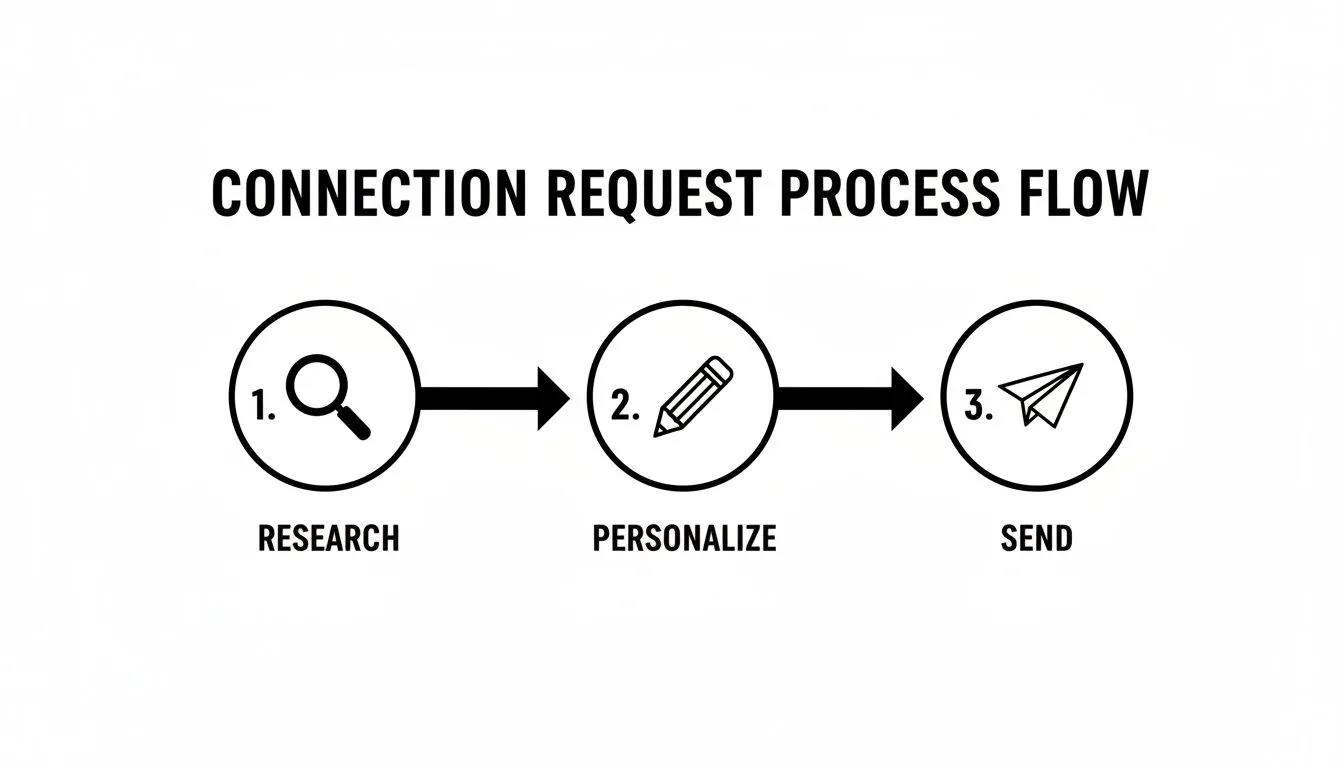
As you can see, successful outreach begins long before you hit "send." That personalization piece is the crucial link between doing your homework and actually reaching out.
Anatomy of a 14-Day Outreach Cadence
So, what does a good, value-packed sequence actually look like? Think of this less as a rigid script and more as a flexible playbook. The one non-negotiable rule is to make every interaction about them, not you.
Here’s a sample cadence that I’ve seen work wonders:
- Day 1: Send that personalized connection request you crafted. Make sure it references something specific, like a shared interest, a recent post of theirs, or a company milestone.
- Day 3: View their profile. It’s a quiet, low-effort move that gets your name in their notifications again, gently reminding them you exist.
- Day 5: If they've accepted, go find one of their posts to engage with. A thoughtful comment that adds to the conversation is infinitely better than a simple "like." If they're not active, try sending a direct message with a relevant article, adding a note like, "Saw this piece on \[topic\] and immediately thought of our chat about it."
- Day 8: Time for a direct follow-up message. Acknowledge their specific role and ask a sharp question or offer a quick insight tied to a common pain point you solve.
- Day 14: Send one last, gentle follow-up. This is what some call the "break-up" message, where you politely close the loop but keep the door open for the future.
This kind of sequence is built to show genuine interest and establish your credibility. It’s a marathon, not a sprint.
Your outreach cadence should feel less like a sales pitch and more like a series of helpful, professional interactions. The goal of each step isn't to get a "yes" but to earn the right to take the next step.
Make Personalization Your Default Setting
In today's world of overflowing inboxes, personalization isn't just a nice-to-have; it's the cost of entry for effective LinkedIn prospecting. The data backs this up completely. A strong reply rate sits somewhere between 30-50%, and we know that approximately 66% of sales professionals are now personalizing their outreach. If you want to see how your own stats compare, you can discover more LinkedIn messaging benchmarks and get a feel for the competitive landscape.
And when I say personalization, I don't just mean using a {FirstName} tag. Real personalization shows you've been paying attention.
- Reference a specific quote from an article they published.
- Congratulate them on a recent company award you saw in the news.
- Connect their job title to a specific challenge you know is common in their industry.
This is the kind of detail that proves you did your homework and aren't just blasting out another generic template. It's the single most effective thing you can do to boost your reply rates and start having actual conversations.
Common Questions (and Straight Answers) About LinkedIn Prospecting
As you start putting these strategies into play, some questions are bound to come up. LinkedIn prospecting isn't static; what worked last year might get you ignored today. So, let's tackle some of the most common questions I hear from sales teams trying to crack the code.
Think of this as your field guide for navigating the tricky parts.
What’s a Good Connection Acceptance Rate, Really?
In 2026, if you're hitting an acceptance rate between 30% and 45% on your connection requests, you're in great shape. That's a solid benchmark for well-personalized outreach. We even see top reps, the ones who are hyper-focused on a smaller list of high-value prospects, push that number past 50%.
On the flip side, if your rate drops below 25%, that's a clear warning sign. It means something in your approach is broken. It's time to pause, go back to your profile and your connection messages, and figure out what’s not clicking. Almost every time, the fix is to stop using generic templates and find a genuine reason to connect with each person.
Should I Automate My LinkedIn Prospecting?
Yes, but with a huge asterisk. The old "spray and pray" days of automation are long gone. That approach doesn't just get you poor results; it's a fast track to getting your account restricted by LinkedIn.
Today, you should think of automation as a way to execute a smart, targeted strategy at scale—not as a substitute for having a strategy in the first place.
Here’s where it makes sense:
- Building Your Lists: Sifting through thousands of profiles to find the exact people who match your ICP is a perfect job for a machine.
- Enriching Your Data: Once you have a list, automation can find verified emails and phone numbers so you can run a proper multi-channel campaign.
- Executing Your Cadence: Running personalized, multi-step sequences without dropping the ball is nearly impossible to do manually at scale.
The point of automation isn't just to send more messages. It's to send better messages to the right people, giving you back the time to actually talk to prospects and close deals.
How Many Follow-Ups Is Too Many?
I've found the sweet spot is a sequence of 3-4 touches on LinkedIn, spread out over two or three weeks. This isn't just four messages begging for a reply. It's a mix of your connection request, a follow-up message, maybe a profile view, and a thoughtful comment on one of their posts.
The goal is for each touchpoint to add a little value or a new perspective, not just to "check in." If you've gone through that sequence and heard nothing but crickets, it's time to move on. Pushing past that point is where you go from persistent to pest, and that can hurt your reputation.
Is Sales Navigator Actually Worth the Money?
For anyone serious about B2B sales, the answer is a resounding yes. Sales Navigator is absolutely essential.
Trying to do real prospecting with a free LinkedIn account is like trying to build a house with only a screwdriver. It’s painful, inefficient, and you're missing the most important tools. The advanced search filters, saved lead lists, and higher messaging limits aren't just nice-to-haves; they are fundamental for any modern B2B sales pro.
Don't think of it as an expense. It's a foundational investment in your ability to generate revenue.
Ready to have an AI sales "employee" put all of this into action for you? Starnus runs your entire outbound engine, from building perfect ICPs and generating leads to writing personalized outreach and managing the campaigns. It handles all the repetitive work, so you can focus on what you do best: selling. See how it works at https://starnus.com.
Ready to automate your outbound sales? Try Starnus and let AI handle prospecting, outreach, and follow-ups while you focus on closing deals.